Thursday, July 09, 2009

Evolution of an Agile .NET Developer in Books


I've been re-reading a few books lately and in the process it made me start to think of how differently I approach software development than when I first started. It seemed that each time I reach another plateau of understanding one or more books helped me get started on the next level. So in this post I wanted to chronicle my growth (which is still happening!) as a developer using .NET along with the key books that helped me. While I did development before .NET (VB & some Java) I am going to only stick to .NET for brevity.

Phase One: Programmer
When you first learn how to write software you learn the syntax of the language (C# in my case) and how to construct programs using that language. I myself did not go to school to be a developer (I was actually on my way to being a professional pilot) so I had very little pretense on theory or approaches. So I wrote code in a very functional way usually.

When I first started in C# I bought Programming C# from Oreilly. This link is to the fifth edition which covers C# 3.0, but I started with the first edition on 1.0 which is now out of print. I always loved the Oreilly books because they were very direct and to the point. This book was a great help in getting started with the language.

As I started to do more with .NET I bought C# in a Nutshell also by Oreilly. This is not a "how to" book but rather a reference for the C# language and the .NET framework. I turned to this book over and over again to figure out which class to use and how to use it. It was a great companion to the Programming C# book.

Phase Two: Developer
Eventually I was more sure of my abilities that I did not have to concentrate so hard on the coding part of developing software. I had a decent grasp of the language and the framework so I started wanting to write software in a more consistent and productive way. Another consultant told me to pick up Code Complete and it started me on my way to adopting some best practices that I still adhere to today. While it had nothing to do with C#, its content was applicable to any development language.

Also during this time I read (or skimmed sometime) quite a few books from WROX on several areas of programming in .NET which all helped me start to address specific problems in my applications.

Phase Three: Architect (or so I thought)
As I started to get better a writing applications using C#, I was being asked more and more to help design these applications then systems of multiple applications. I was lucky to work with many people who were much smarter than I was and they turned me on to quite a few good resources.

During one design session I was complaining about finding a solution to a particular problem and a colleague shook his head at me and asked, "Haven't you read the gang of four Design Patterns book?" I had to sheepishly admit I have never heard of it and then immediately went out and read it that week. After which I realized I had been describing a picture perfect scenario for an Abstract Factory pattern. I then bought two books on design patterns for C#: Design Patterns in C# and C# Design Patterns: A Tutorial . Using all three books I really started to delve into learning how to write more solid, reusable software.

Phase Four: Team Lead
Once I had been the architect or lead developer on a few projects I was being asked to lead development teams on bigger projects and that when I started to dabble in the project management and business analysis side of the software development lifecycle more. Either I was frustrated by the people in these positions or the project was small enough where the development team took on these duties. Either way I felt there were better ways to do both.

One of the project managers I worked with who was very good at his job loaned me a copy of the Mythical Man Month and it helped me start to think about projects in a wider scope than just the development effort. I was a big help in understanding how to interface with customers and managers and understand how to measure the progress of a project.

I was also given a copy of Software Requirements which gave me a new perspective on gathering requirements and mapping features to coding efforts. At this time I was also introduced to Rational's RequisitePro product which implemented a good deal of the concepts behind the book.

Phase Five: The Reluctant Agilist
By this time I had been leading software development projects for a few years with a good degree of success. I will admit I thought I had it all pretty under control and then a project that went bad started me rethinking how I developed software. Methods that had been tried and true for so long had failed and I was looking for some new ideas. At a new company I was re-introduced to the Scrum process for Agile development. I had heard of this before but to be honest I had dismissed it as the inmates running the asylum. Some of the engineering practices were appealing but overall I was fairly skeptical.

We did a pretty good job of adopting Scrum in all the wrong ways so I turned to Ken Schwaber's two definitive books on the topic: Agile Project Management with Scrum and The Enterprise and Scrum. To be honest I did not come away with much. Not that these are not good books but I tend to learn backwards in that I sometimes need the mechanics of something before I can relate it to the underlying concept. I then downloaded Henrik Kniberg's Scrum and XP From the Trenches and this book helped tie the concepts and mechanics together for me.

Phase Six: Agile Developer
On my next project I took all the things I had learned from our previous rough adoption of Scrum and applied it to our approach. I was lucky in that the management of my new client was very Agile friendly. I now really saw Scrum working and I started to concentrate on how to write my software in a more Agile way.

I attend a local Agile user group and won Practices of an Agile Developer. It was great in two ways because it not introduced some new concepts to me, it reaffirmed some of the lessons I had learned of the past few projects. It was a very easy to read book that provided a lot of information. At the next meeting I won the Art of Agile Development, which built upon everything I had just learned. Both these books made me want to learn Test Driven Development (TDD) better so I then grabbed Test Driven Development in Microsoft .NET.

I recently went back and reread Agile Principles, Patterns, and Practices in C# because when I was first given the book I was still not convinced about Agile and I really only skimmed the material. Going over it now had a much greater impact and there is so much great content that can be applied even outside of Agile that I suggest it to any developer regardless of their approach.

Phase Seven: The Empty Vessel
As I write this I have to say I am a little ashamed at how at some of these levels I thought I really knew everything I needed to know. It has made me really open myself up to learning as much as I can and figuring out the best way to apply that knowledge in my day to day activities. It was humbling to look at the publication dates on some of the books and think, "This has been around for awhile and I am just now learning it!"

There were more books along the way but I wanted to point out the ones that really pushed me to the next level of my development career and I hope to be constantly adding to this list for as long as I write software.

Thought Leadership is Good for Business

I have been lucky to work for some great consulting companies over the years who recognize the importance of their consultants actively participating in thought leadership and IT community activities. I was a technical trainer for a large part of my career and really enjoyed teaching. When I went into consulting it was great to practice what I had preached for so long but I began to miss being in front of a class. When .NET first appeared on the horizon, I along with several of my colleagues jumped on it and before long we were asked to start presenting what we had done at various technical organization in my area. At my very first presentation an attendee later contacted my company to bring us in to help them with their .NET adoption. The value was immediately obvious.

Since then I have strived to be as active a I can in local, regional, and national technology organizations as a participant, speaker, and organizer and I have seen first hand how this has helped my respective companies. Here are a few of the ways these activities have helped with our business:

  • Attracting New Employees: I've often had people come up and ask me about working with some cool technology. I always make it a point to only present on technology I have actually worked with and I've been lucky to see a wide range of solutions. When other developers hear about the projects I have worked on they too get excited and interested in being involved.
  • Advertising Your Solutions: Sometimes your company may have expertise in a certain technology and it is not widely known in your area. Presenting for multiple organizations helps get the word out that you have value to offer in a certain space.
  • Positioning Yourself as an Expert: It is easy to look like an expert for 60 minutes when you have plenty of time up front to plan, but when you really know the material it is obvious to your attendees. This does well to market your own abilities and thereby your company's abilities. While there may be other people with the same skill set in a certain technology, effectively being able to communicate and explain it is just as valuable.
  • Improving Employee's Communication Skills: Some developers are great at developing, but not so great at communicating. As a consultant, communication is a skill that is almost as valuable as your coding skills. Companies that encourage their employees to present are helping them grow these skills also.
  • Differentiates You from Your Competitors: There may be many companies that offer the same services are you do, but being seen as a thought leader in a certain space can really set you apart from your competition.

As you can see, there are some very real benefits to participating in IT communities as a Thought Leader. Companies who encourage the employees to pursue these activities and invest in them can see some very tangible gains. Even attending and supporting local IT groups can help with your business so get out there and be active!


Thursday, June 18, 2009

Virtual Sprint Task Board Using a Wii Remote

While I love implementing Scrum in Team System, nothing can quite compare to a physical story wall of sprint task board. The intimacy and tactile nature of moving cards around on the board cannot be replaced. However, a good many of my clients who are implementing Scrum shy away from using note cards and sticky notes. Conchango provides a very cool WPF app that simulates a sprint task board, but even when you have it projected on a large screen, someone still has to sit at the computer to move items around and it is either a logistical nightmare having each person sit down to do this or one person does it while everyone tells them what they did and you start to loose the attributes that make the task board such a great tool.


You could go out and buy a large touch screen monitor and mount it in the Daily Scrum room if you have $3000 to $5000 just lying around. Or you could buy an interactive "smart" white board for about the same cost. If your company is that much invested in Scrum that they will approve such an expense, please let me send you my resume! The rest of us do not have that kind of money to spend and I was very intrigued when someone sent me this link to a YouTube video featuring an interactive story wall using Mingle. Upon further investigation this setup can be easily achieved with less that $100.

Johnny Chung Lee from Carnegie Mellon University came up with an ingenious way to use a Nintendo Wii Remote to create an interactive whiteboard. Here is what you need:


Getting Connected with Bluetooth

The first laptop I tried this on was a Sony Viao and it came with the standard Windows XP Bluetooth stack which while it will see the Wii Remote it does not really know what to do with it even once it have been connected. I had to download the stack from Bluesoleil to get it the connect and be recognized by the Wiimote Whiteboard Software. The download is only a trial and the purchase the product it was $30 USD. My work laptop did not have Bluetooth so I just decided to buy a Bluetooth receiver so I could then setup everything up on any computer with a USB port. The website WiiBrew has a list of Bluetooth drivers and receivers that are known to work with the Wiimote. I bought the Cirago BTA-3210 USB 2.0 Micro V2.0+EDR Bluetooth Dongle on TigerDirect for around $20 and it comes with the Toshiba Bluetooth drivers.


I inserted the Cirago receiver into my USB port and installed the drivers from the included CD. After a reboot I opened the Bluetooth Settings windows and clicked new connection, I pressed the 1 and 2 buttons on the Wii remote to put it is discovery mode and it was recognized without a hitch.

The IR Pen

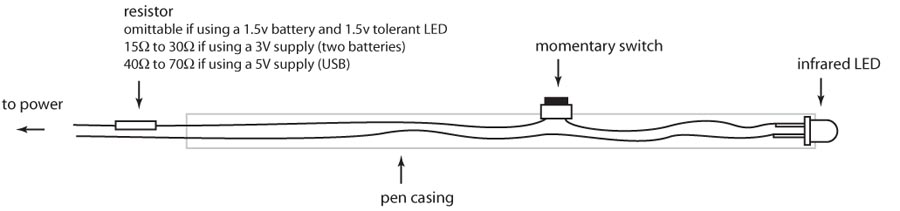
I mentioned this project to my wife early on and she ordered me several LED pens from Amazon which was very sweet of her but none of them worked. You need an IR pen with certain specifications. There are many sites with the specs on how to build one, but I just purchased one from Wiiteachers.com for around $18. It is a standard Expo dry erase marker that they gutted and then fitted with the IR light, a switch, and place to put a single AAA battery. There are a few fancier pens out there, but this one was cheap and worked well.


Setting it all Up

Once I had everything (I already had a few Wii remotes at home although the kids did complain when I took one away for work), I setup a projector connected to my laptop, connected the Wii remote via my Bluetooth receiver, ran the Wiimote Whiteboard application, calibrated the IR pen, and was using the pen as a mouse.

A few notes on the setup:

Set the Wii Remote to the side with a clear view of the entire projected screen. The IR sensor has about a 45 degree angle and several times the calibration worked fine but it could not see the outer edges of my screen. I finally mounted (with a rubber band) the Wii remote to my camera tripod and set it over to the side of the wall I was projected on.

When you use the pen you have to make sure you body is not blocking it from the IR sensor on the Wii remote. This was not too much of an issue because I had to be to the side of where I was using the pen anyway as to not cast a shadow over the projected area.

If you bump the Wii remote, the projector, or resize your desktop you will need to recalibrate the pen. This is very easy to do with the Wiimote Whiteboard application. Also if you use it with a Virtual PC image, the desktop resolution on the Virtual PC needs to be the same as the host desktop or the pointer and the pen are off a bit.


The Virtual Sprint Task Board

Once everything was working I opened up my Virtual PC with Team System 2008 and the Conchango Sprint Task Board application. The setup works great and I can easily move tasks from one state to another as well as tap on an item to get the detail pop up window. The scale slider at the top of the board allows you to zoom in and out so you can see the entire board or zoom into a specific set of User Stories.

Windows comes with a virtual keyboard that you can use to type using the IR pen. This is not super optimal, but it works for small things like updating a tasks remaining hours. The Windows version is fairly rudimentary so I downloaded the freeware version of Touch-It's virtual keyboard which had some added features like docking, customizable keyboard layouts, etc.

While it is still not the same as an actual physical board with note cards, for those using an Agile management tool already this is a cheap way to get close to it. Here is a short video of me setting this up and using the task board.


Thursday, June 11, 2009

Farewell eScrum, We Barely Knew Ya!


Brian Harry announced on his blog this week that Microsoft's Team Foundation Server process template eScrum was no longer going to be supported. eScrum was the Jan Brady to Conchango's Marsha as far as Scrum templates go, and with VSTS 2010's MSF Agile template looking more and more scrummish it was only a matter of time. So poor some OE on the pavement because this one is for my dead homie eScrum.

Saturday, June 06, 2009

Upcoming Microsoft Events in Nashville

Next week is a very busy week for events here in Nashville:

nPlus1 Summer Summit
nPlus1.org is hosting its third Architecture Summit on June 10th at the Microsoft office in Nashville, TN (Franklin). The topic of this summit will be Patterns and Principles.

Session One: Software Patterns
Patterns are an important tool to use as architects and developers. They provide a common vocabulary for us to design with, as well as a common approach to a common problem. Come learn about useful patterns, and how to use them in your everyday code.

Session Two: How I Learned To Love Dependency Injection
Dependency Injection is one of those scary topics that most developers avoid. It sounds all ‘high-falootin’ and complex. It’s not. Really. We wouldn’t lie. It’s a great way to manage complexity in your system, and a great way to make your system so much more testable. And isn’t that what we all want?

Each session will be followed by open discussions periods. A catered lunch will be provided starting at noon when the welcome time begins.

When & Where
Wednesday, June 10, 2009 12:00 PM - 5:00 PM
Microsoft Office - Franklin
2555 Meridian Blvd, Suite 300
Franklin, TN 37067

Click here to register for this event.

Microsoft ArcReady: Architecting for the Client Tier
The client (or presentation) tier of our applications is taking on an increasingly important role. Users are expecting more compelling user interfaces, but they also want more functionality from their applications. In this ArcReady we examine how to design and deliver well architected client applications that will be easy to maintain and extend.

Session 1: Trends and patterns on the client tier
In our first session we will take a vendor and platform neutral look at some of the trends and emerging technologies that can be used on the client tier. We will look at techniques like Mashups, technologies like Natural User Interfaces (NUI) and the increasing importance of the mobile platform. We will also look at some common patterns that can be used in the architecture of the client tier.

Session 2: Applying Microsoft technology on the client tier
In our second session we will take some look at how we can use Microsoft technologies to create well architected and compelling client applications. We will look at technologies like Silverlight and WPF that can be used to create compelling clients. We will also look at technologies that can be used to make your applications more extensible for future development. We will also examine some architectural guidance developed by the Microsoft Patterns and Practices group.

When & Where
Friday, June 12, 2009 9:00 AM - 11:45 AM
Microsoft Office - Franklin
2555 Meridian Blvd, Suite 300
Franklin, TN 37067

Click here to register for this event.


MSDN Events Unleashed
Internet Explorer 8 for Developers
The Windows Internet Explorer 8 browser makes it easier to explore and interact with the web. Did you know that there will be a new standards mode by default? While it can easily be turned off, knowing the potential to impact this may have on many sites that have been crafted around various features in past versions is a good idea. Attend this session to learn which current practices you need to change and how the new standards mode affects your development techniques and your existing sites. We review tools that are built into Internet Explorer 8 to help developers debug and create Web pages. We also discuss Web Slices, Accelerators, and Search Suggestion – all of which are key new features in this latest release.

In this session we’ll show you:

- Developer Tools
- Selectors API
- Use and create accelerators
- Use and create web slices
- Use and create search suggestions
- AJAX Navigation enhancements with Virtual Earth demo on history, AJAX Cross Domain Calls
- CSS improvements (printing, counters, new pseudo classes)

Developing on Microsoft Windows 7
Building applications that are easy to use, visually appealing, and offer high performance is a challenge that developers face every day. Innovative applications can greatly improve the user experience, empowering companies to differentiate their services and solutions. However, developers are increasingly asked to do more in less time, while also optimizing the power and performance requirements of their applications. The Windows 7 platform makes it easy for developers to create engaging, user-friendly applications by providing familiar tools and rich development features that allow them to take advantage of the latest PC capabilities. In this session we will explore the new Taskbar and Jump Lists, the Scenic Ribbon, file management with Libraries, and Windows Web Services among many other enhancements to the new operating system.

In this session we’ll show you:

- New Features in Windows 7
- Use and create jump lists
- Scenic Ribbon API
- Use and create Libraries
- Windows Web Services API
- Additional enhancements that support development

When & Where
Friday, June 12, 2009 1:00 PM - 2:50 PM
Microsoft Office - Franklin
2555 Meridian Blvd, Suite 300
Franklin, TN 37067

Click here to register for this event.


TechNet Events Unleashed
Session 1: Windows Server 2008 R2 – Optimize Your Time
Get a jump start on your peers with Windows Server 2008 R2 by joining us for this no nonsense technical session, where we will discuss the critical improvements in the next version of Windows Server. Some have argued that, given the impressive scope of new functionality in Windows Server 2008 R2, it should not be an “R2” release, but rather should be given a completely new name. They point to features such as Direct Access, Branch Caching, Live Migration, Powershell 2.0, and VDI that will help you cut down on the amount of time you spend doing mundane tasks, reduce end user frustration and support headaches, and give your mobile workforce a competitive edge through ubiquitous access to company data. There’s a good chance that by attending this session you’ll find a way to save time and money with Windows Server 2008 R2, and so you’ll get the time you spend with us back many times over.

Session 2: Windows 7 – Maximize Your Potential
In designing Windows 7, the engineering team had a clear focus on what we call ‘the fundamentals': performance, application compatibility, device compatibility, reliability, security and battery life. Early reviews of Windows 7 seem to indicate that the choice to focus on the fundamentals is resonating well with many users and professionals. And, IT professionals will further benefit from the enhancements to manageability and security. You’ll also learn how your investments in testing and evaluating Windows Vista will pay off in the transition to Windows 7. Come see firsthand what all the buzz is about in this demo-intensive session where we explore the UI improvements, performance gains, and manageability enhancements in the next client operating system from Microsoft.

Session 3: Internet Explorer 8 – Get Excited About the Browser Again
Internet Explorer is currently the most widely used browser in business, and while we’ve seen nice incremental improvements to IE in recent history, we haven’t seen as many truly earth shattering changes. Well, many agree that the next release of IE, Internet Explorer 8, provides the most compelling upgrade to IE in many years. In a typical day, users spend 2 hours or more per day in the browser, so significant improvements here can have tremendous impact on productivity and the way we work. The browser needs to be thought of in the same terms as an operating system—it has to be rich, robust, interoperable, easy to use and secure. Internet Explorer 8 is a browser that meets these needs and more for users, enterprises, IT professionals and developers alike. Come learn how the new improvements, too numerous to mention here, are driving many to get excited about the browser again.

When & Where
Friday, June 12, 2009 3:10 PM - 5:00 PM
Microsoft Office - Franklin
2555 Meridian Blvd, Suite 300
Franklin, TN 37067

Click here to register for this event.

CMA Music Festival - Microsoft Booth
If you are going to the CMA Music Festival June 12th - 14th, stop by the Microsoft booth to see demos of IE8, Surface, cool Silverlight apps, and more. They will also have XBoxes and Guitar Hero setup for you to play. I am manning the booth on Sunday so drop by and say hi!