As I have worked on Scrum teams in companies that were traditionally waterfall, I have observed how the various team members struggle with the concept of the collaborative, cross functional team. Ken Schwaber describes the tendency to resist these changes and fall back into old habits as “muscle memory”. When a traditional project manager was brought onto our team as our Product Owner, he asked several questions and received answers he was not expecting:
Question: Where is the functional requirements documentation?
Answer: There is none. They are in the Product Backlog as User Stories.
Question: Where is the architectural and design documentation?
Answer: There is none. It is in the code itself.
Question: When do I get status reports?
Answer: Never. Every day we have a Daily Scrum and update our tasks in the Sprint Backlog.
While I am not a true agilist, I do believe that relying on static documentation and periodic status reports to keep track of a project is what I call “managing from afar for plausible deniability.” Being a part of a Scrum Team means accepting a large level of responsibility. Product Owners cannot simply stroll in occasionally and rely on one-off status reports to gauge how well a project is going. Everyone is involved and it is not an opt-in process. No one on a Scrum should ever be able to use the excuse “I did not know…”
This does not only affect the Product Owner. The most resistance I have gotten in the past is from Quality Assurance. Typically they are used to detailed specifications to create detailed test cases that they execute after the development process is over. In a Scrum Team, the QA testers are peer members just as much as the developers. I’ve had the complaint before that all QA was given at the start of a Sprint to create their test cases were User Stories and Conditions of Acceptance. My response is “You’re right, but that’s all I have to go on too and I have to write the code!” The best way to get QA on board in my experience so far has been to have them at every Daily Scrum and in any design or requirements gathering sessions the developers have. This means getting your testers out of their section of the office and in the thick of the development team. They can use the User Story as a starting point and then flesh out their test cases along with the developers as the functionality is created. They can perform dry runs on code that is nearing completion so that at the end of the Sprint the goal would be that all code has been QA tested at least once.
Developers are not immune to this ailment either. Some junior or less disciplined developers may become vapor locked when they have to start coding without a detailed specification. You cannot go code in the corner and be fed requirements and Jolt cola through a slot in the door. You should not turn to the Scrum Master when you have finished a task and ask “What next?” The excuse “That’s what it said in the spec” is no longer valid. Team members must rely on constant collaboration to make sure the developed solution meets the user’s needs as well as the team’s technical standards.
I must admit the teams I have been on have experienced these problems and we still struggle against old habits. We try to make good use of the Sprint Retrospective to adjust each iteration to make the process better. Our Scrum Team has met every date, encountered very few QA or production defects, and has made our stakeholders consistently happy. We have done this through constant collaboration across all members and by evolving our process. There have been very few late nights and no death marches. And I have to say that the experience had made my statement of not really being an agilist less true each time I say it.
Wednesday, July 16, 2008
Monday, July 07, 2008
Conchango Task Board for Team System Beta Released
The Conchango Task Board for Team System has been been released in Beta. It only works with TFS/VSTS 2008 and the 2.0 version of the Scrum process template. You can download it here.
Sunday, June 29, 2008
TFS API: Work ItemHistory
One of the tasks I had while developing my own version of a Sprint Task Board was to note each work item’s “staleness”. This meant that for any Sprint Backlog task that was in a state of “In Progress” or “Ready for Test” I needed to know the last time its Work Remaining field had been updated.
The Team Foundation Server API provides an easy object model for iterating through a work item’s history. Each WorkItem has a Revisions collection that holds individual snap shots of the work item each time it was updated. The Revisions in the collection are in order or earliest to latest, but there is also a Rev property for each one that is the sequential order. Each Revision has a collection of Fields for each field, both the common system fields and any fields added from a custom process template. When you access an individual Field in the Revision you can see what the original value was (OriginalValue) versus what the value was changed to in the revision (Value). If the field was not changed the values are the same.
 Since this is the very first time the work item was saved the OriginalValue property on all fields is null. The ChangedDate is the date we saved this particular revision and the RevisedDate is displayed as the maximum value of the DateTime type since this particular revision has not been revised yet. If we edit the work item on June 3rd the Revisions would look like this:
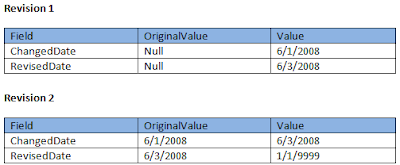 The RevisedDate for Revision 1 is set to the ChangedDate for Revision 2. The fields for Revision 2 now have their OriginalValues populated with the appropriate values from Revision 1.
So based on the examples above, if we want to know the last time a specific field was updated you would look for the “System.ChangedDate” field’s Value for the latest Revision where that field’s OriginalValue and Value properties are not equal. Here is a LINQ query that would accomplish this for the “Work Remaining” field (this field is an extended field that comes with the Conchango Agile Process Template).
One thing to remember when using the Work Item object model is its effect on performance. Not all fields are loaded initially so depending on how you access the WorkItemStore you may incur additional round trips to the server. This MSDN article does a good job of explaining how this works and what your options are to increase performance.
The Team Foundation Server API provides an easy object model for iterating through a work item’s history. Each WorkItem has a Revisions collection that holds individual snap shots of the work item each time it was updated. The Revisions in the collection are in order or earliest to latest, but there is also a Rev property for each one that is the sequential order. Each Revision has a collection of Fields for each field, both the common system fields and any fields added from a custom process template. When you access an individual Field in the Revision you can see what the original value was (OriginalValue) versus what the value was changed to in the revision (Value). If the field was not changed the values are the same.
 Since this is the very first time the work item was saved the OriginalValue property on all fields is null. The ChangedDate is the date we saved this particular revision and the RevisedDate is displayed as the maximum value of the DateTime type since this particular revision has not been revised yet. If we edit the work item on June 3rd the Revisions would look like this:The RevisedDate for Revision 1 is set to the ChangedDate for Revision 2. The fields for Revision 2 now have their OriginalValues populated with the appropriate values from Revision 1.
So based on the examples above, if we want to know the last time a specific field was updated you would look for the “System.ChangedDate” field’s Value for the latest Revision where that field’s OriginalValue and Value properties are not equal. Here is a LINQ query that would accomplish this for the “Work Remaining” field (this field is an extended field that comes with the Conchango Agile Process Template).
One thing to remember when using the Work Item object model is its effect on performance. Not all fields are loaded initially so depending on how you access the WorkItemStore you may incur additional round trips to the server. This MSDN article does a good job of explaining how this works and what your options are to increase performance.
Conchango's Sprint Task Board
I wanted to thank Crispin for giving me the heads up that Conchango has posted two video demos of their upcoming Sprint Task Board application. As I stated in my last few blog posts, I had been working on something similar but where Conchango has dedicated development resources, I had only a few spare hours here and there between work and handling the new baby. I look forward to the release of this application and will post a review as soon as it is out. I did learn a good deal more about the TFS API while working on my own pet project and I am working on some more in-depth technical posts in the next week or so.
Monday, June 16, 2008
Sprint Task Board Update
I wanted to clarify that the Sprint Task Board project I mentioned last post is by far not an original idea. It is simply a side project for me to create a version that does exactly what I want it to do. There are various other versions of this in Scrum management products like Mingle and ScrumWorks. Conchango has even hinted at one for Team Foundation Server in a reply to one of my forum posts.
Working on this has helped me get deeper into the Team Foundation Server API and I will post soon about some interesting discoveries in the work item history objects.
Working on this has helped me get deeper into the Team Foundation Server API and I will post soon about some interesting discoveries in the work item history objects.
Subscribe to:
Posts (Atom)